How to Make Something Look Less AI Generated
If you have ever looked at a photo or a piece of writing and thought “something is off,” you already know the feeling I am talking about. That feeling has a name now, and most people who create content regularly are trying to solve it. If you want to know how to make something look less AI generated, the short answer is that you need to break the patterns AI tools default to: overly smooth textures, too-perfect symmetry, generic phrasing, and a total absence of small human quirks. Fix those, and both images and text stop giving themselves away.
Let me explain this from two points of view since the reason people search on this subject is generally one of two things: either you are dealing with images produced by AI and would like them to appear as if they are real photographs, or you are working with text generated by AI and would like it to sound as though it was actually written by a person. I’ll look at both cases because the basic idea reintroducing the flaws that AI tends to remove applies in each instance.
Before carrying on, let me make one thing clear: this is not about deceiving anyone in a harmful manner, for example by faking evidence, impersonating a real person, or misrepresenting a product. It’s simply about creating content that appears natural, well polished, and human rather than stiff or artificial, and that is a completely normal aim for a creative and editorial effort.
Why AI-Generated Content Looks “Off” in the First Place
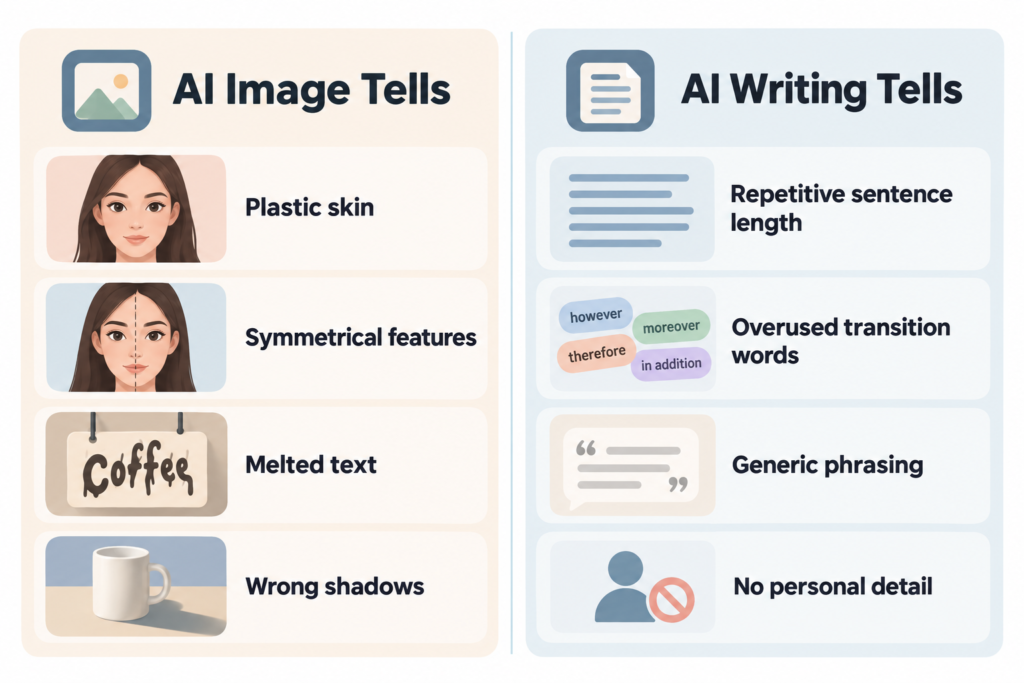
AI image generators and AI writing tools are designed to create the kind of output that is most likely according to statistics, and it is precisely this habit that causes the results to seem artificial. In the case of images, the skin appears as if it has been airbrushed, the lighting is too even, and the backgrounds blur in a manner that a real camera lens never would. With regard to text, it has predictable sentence rhythms, uses safe transitions, and has a tendency to repeat some words and phrases.
A landmark study published in the peer-reviewed journal PNAS found that people correctly identified AI-synthesized faces as fake only about 48 percent of the time, which was close to random chance. That same research found that participants actually rated the AI-generated faces as more trustworthy than real ones. So the issue is not that AI content always looks fake to the human eye. It is that specific, learnable details give it away to anyone paying close attention, including automated detectors trained specifically to spot those details.
How to Make an AI Image Look Less AI Generated
If the thing you are most concerned about is photographs or portraits produced using tools such as Midjourney, DALL-E, or Stable Diffusion, the solutions generally consist of adding back the imperfections that a real camera and a real environment naturally produce.
1. Add Camera and Lens Language to Your Prompt
Before you even generate the image, describe it the way a photographer would talk about a real shoot. Mentioning a specific lens, aperture, and lighting setup pushes the model away from its default “illustrated” look and toward something closer to a photograph.
- Mention a lens type, such as a 35mm or 50mm prime lens
- Specify an aperture, like f/1.8, to create natural depth of field
- Describe the light source directly: window light, overcast sky, single softbox, golden hour
- Ask for a specific film stock or ISO setting, since this nudges the model toward visible grain instead of a flawless digital finish
2. Fix the Skin, Hands, and Eyes
It is in these three areas that AI models have the greatest difficulty, and they are generally the first ones examined by a knowledgeable person or by a detection tool.
- Use inpainting or a masking tool to regenerate just the hands if the finger count or shape looks wrong, rather than discarding the whole image
- Add subtle texture back into skin using a texture or grain overlay at low opacity, since AI skin is often unnaturally smooth
- Check that both eyes are pointed in a consistent direction and that catchlights (the small reflection of a light source) appear in both eyes the same way
3. Break Perfect Symmetry
Actual faces and real scenes lack perfect symmetry, whereas those produced by AI often do have it. A minor adjustment such as slightly altering one eyebrow, tilting the head a few degrees, or moving the crop a little off-center can make a noticeable difference without needing advanced editing skills.
4. Add Grain, Noise, and Natural Color Variation
Digital cameras and film both produce a small amount of visible grain, especially in shadows.One of the most reliable indications is the absence of this feature in AI-generated images; if a slight grain layer is added, the image is slightly desaturated or a mild colour tint is introduced for example, a warm tone typical of tungsten lighting the image will appear as though it has been actually captured rather than produced by a computer.
5. Adjust Generation Settings, Not Just the Final Image
When you have access to the advanced settings, some technical adjustments can be made to reduce the “AI look” even before you start the editing process.
| Setting | What It Does | Recommended Adjustment |
|---|---|---|
| CFG / Guidance Scale | Controls how strictly the model follows your prompt | Lower it slightly (for example, from 7 to 4) for more natural, less over-processed results |
| Sampling steps | Controls how refined the image becomes | Moderate steps often look more natural than the maximum setting, which can over-smooth details |
| Upscaling method | Increases resolution | Choose an upscaler built for photorealism rather than illustration, and avoid heavy sharpening |
| Post-processing | Final polish | Apply grain and slight blur variation instead of contrast boosts, which tend to look more synthetic |
How to Make AI Writing Look Less AI Generated
When what you’re worried about is text and not images, the solutions are different but work on the same principle by restoring the small irregularities which AI writing tends to eliminate.
Common Habits That Give AI Writing Away
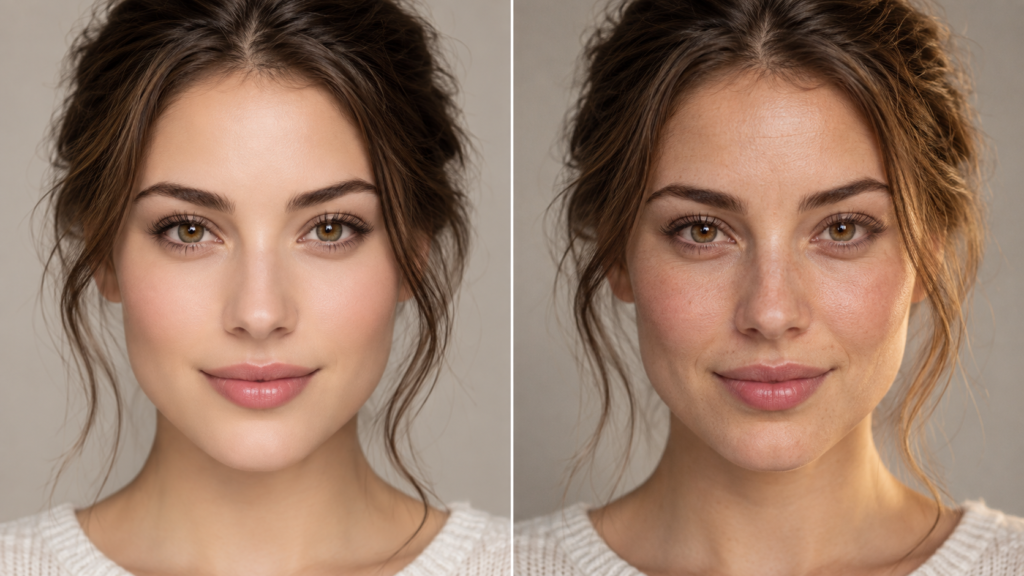
- Overuse of certain transition words and stock phrases, like “in today’s fast-paced world” or “game-changer”
- Sentences that all land in a similar medium length, creating a flat, repetitive rhythm
- A polished, almost too-careful tone with no strong opinions or specific details
- Very few contractions, and an avoidance of starting sentences with “and” or “but,” which people do naturally in conversation
Practical Fixes
- Read it out loud. If a sentence feels awkward to say, it usually reads as unnatural too. This is one of the fastest ways to catch robotic phrasing.
- Vary your sentence length on purpose. Follow a longer, detailed sentence with something short. That contrast is a strong signal of human writing.
- Replace vague claims with specifics. Instead of a generic statement, name an actual detail, number, or example that supports the point.
- Add a genuine personal angle where it is true. A short, honest observation from real experience adds a voice that AI models cannot fabricate convincingly.
- Cut the clichés. If a phrase feels like something you have read a hundred times, rewrite it in plainer, more direct language.
- Let a few small imperfections stay. A slightly informal phrase, a rhetorical question, or a sentence fragment used for effect all read as human.
A Quick Comparison: AI Draft vs. Edited Version
| AI-Style Draft | Edited, More Human Version |
|---|---|
| “In today’s fast-paced digital landscape, businesses must leverage cutting-edge tools to stay competitive.” | “Most businesses I talk to are already stretched thin, so the tools that actually help are the ones that save time, not add another dashboard to check.” |
| “It is important to note that consistency is key to achieving long-term success.” | “Consistency matters more than intensity. Showing up on the average days is what actually moves the needle.” |
Checking Your Work With an AI Image Detector
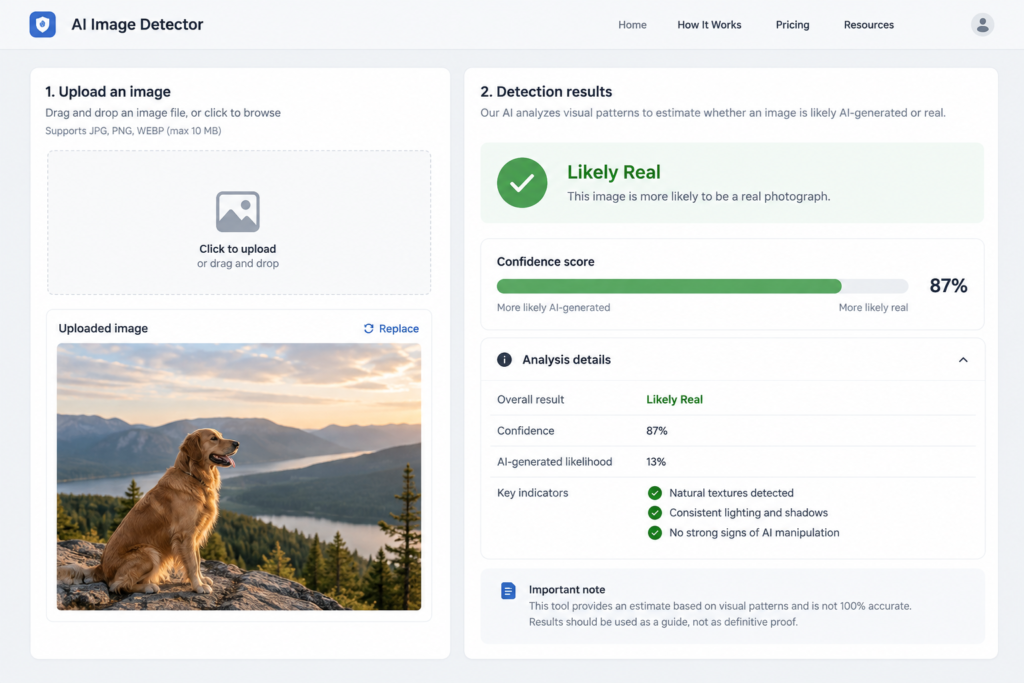
It’s a good idea after carrying out your edits to use an AI image detector to check whether the changes have really reduced the obvious signs. Such tools examine pixel-level patterns, compression artifacts, and statistical inconsistencies which are difficult to notice with the unaided eye but are precisely the sorts of things that detection models have been trained to identify.
A few things worth understanding before you rely on one:
- No detector is 100 percent accurate. Most reputable tools report accuracy in the low-to-mid 90s percent range under controlled testing, but that drops with heavy compression, cropping, or re-uploading to social platforms.
- Detectors are updated regularly to keep up with new generators, so a tool that missed an image last year might catch a similar one today, and vice versa.
- A “low AI probability” score is not the same as proof an image is real. Treat detector results as one data point, not a final verdict.
If you are curious about how detection works on the text side instead of images, our guide on how a professor can detect ChatGPT breaks down the specific signals instructors and detection tools look for in written work, many of which overlap with the writing habits covered above.
Content Credentials and Metadata: The Other Side of This Conversation
There is a growing industry effort that works in the opposite direction of “hiding” AI origin, and it is worth knowing about even if your goal is just to make an image look more natural. The Coalition for Content Provenance and Authenticity, known as C2PA, has built an open technical standard called Content Credentials that embeds cryptographically signed metadata into a file to show its origin and edit history, including whether it was created with AI. Major companies including Adobe, Microsoft, Google, and OpenAI now support this standard in their generation tools, and anyone can check a file’s history for free using the Content Credentials verification tool.
This matters for two practical reasons. First, if you generate an image with a tool that automatically embeds this metadata, simply editing the visual appearance will not remove the underlying disclosure unless you strip metadata entirely (which some export settings and platforms do automatically). Second, if authenticity and trust matter for your use case, such as journalism, stock photography, or client work, disclosing AI involvement through Content Credentials is often a more defensible approach than trying to hide it, since the FTC has warned companies to be upfront about who or what actually created a piece of content when that information could affect a consumer’s decision.
Common Mistakes to Avoid
- Over-sharpening instead of adding texture. Sharpening tools can make AI images look more artificial, not less, because they exaggerate the smoothness that already exists.
- Ignoring hands and background details. Faces get the most attention, but distorted hands, warped text in the background, or inconsistent shadows are often the first things both people and detectors notice.
- Relying on a single AI detector’s verdict. Different tools use different training data and can disagree on the same image, so cross-checking matters if the stakes are high.
- Editing text with a thesaurus swap instead of a real rewrite. Simply substituting synonyms into AI-written sentences keeps the same stiff structure and rarely fixes the underlying issue.
- Forgetting platform recompression. Uploading to social media strips metadata and recompresses images, which can either help or hurt depending on what signals you were trying to preserve or remove.
Costs, Time, and Difficulty
If you’re familiar with simple photo editing tools, manually making an AI-generated image appear more natural usually takes between 10 and 30 minutes, and most of the software you’ll need—such as GIMP or the free versions of AI upscalers—doesn’t require you to have a paid subscription. Editing AI-generated text, on the other hand, takes much longer, typically between 20 and 40 minutes for every 1,000 words, since it involves actually reading the text and rewriting it rather than just applying one filter. When you’re carrying out this kind of work on a large scale for a business, it’s worthwhile to budget for a proper photo editing subscription or for the time of a professional editor once your output exceeds a few pieces per week.
Frequently Asked Questions
What can I do to make my AI-generated image more realistic without using expensive software?
Tools that are available free of charge, such as GIMP or the free versions of upscaling services, are able to add grain, adjust the skin texture, and correct minor distortions. Generally, the effect of making a number of small and specific edits for instance, fixing the hands and adding a bit of grain is greater than that of applying one heavy filter.
Does adding noise or grain actually fool an AI image detector?
It can reduce certain statistical signals detectors look for, but it is not guaranteed, since detection tools built for major generators like Midjourney, DALL-E, and Stable Diffusion report accuracy above 95 percent on unmodified images. That accuracy is measured against clean, uncompressed files, not edited ones. Heavier edits reduce accuracy but do not eliminate detection risk entirely.
Whether it is dishonest to make AI-generated content appear less like it was produced by AI depends on the situation. It is standard practice in the creative field to edit an image or improve writing to enhance its quality and readability. However, it turns into a problem only when you falsely present work that has been assisted by AI as having been completely created by a human in a context where such a distinction matters legally, academically, or commercially for example, in advertising claims or when submitting academic work.
The difference between an AI image detector and a plagiarism checker is that an AI image detector works by examining pixel patterns and compression artifacts in order to judge whether or not an image has been artificially generated, while a plagiarism checker compares text with previously published material in order to identify any passages that have been copied. Since they address different issues, neither of them is capable of reliably detecting the other type of content.
Can AI metadata be completely removed from an image?
In most cases, yes, as actions such as taking a screenshot, re-saving the image using certain editors, or uploading it to websites that remove metadata will eliminate the embedded Content Credentials. However, since some more recent camera and generator hardware mark images in a manner that is more difficult to remove, the outcomes depend on the particular tool and file format.
Why do AI-generated articles still end up being flagged even when they have been extensively edited?
This is because the detection tools tend to examine statistical patterns at the sentence level, not merely the individual words chosen, and therefore simple edits such as replacing words don’t always alter the fundamental pattern. It is more effective to carry out a genuine rewrite that modifies the sentence structure and includes specific, verifiable details.
Is there a legal risk to publishing AI-generated images or text without disclosure?
General blog content usually carries low legal risk, but commercial advertising, journalism, and academic work carry more scrutiny. If you plan to choose an AI tool for ongoing content production, our guide on how to choose an AI video generator for your workflow also covers licensing and disclosure considerations that apply across AI-generated media, not just video.
Final Thoughts
Making something look less AI generated really comes down to noticing what AI tools consistently get wrong and fixing those specific spots rather than applying a blanket filter over everything. For images, that means texture, asymmetry, and lighting. For writing, it means sentence rhythm, specificity, and an honest personal voice. Run your work through an AI image detector or read it back critically before you publish, and treat the result as a helpful check rather than a final verdict.
If you are working on AI content regularly, whether that is images, video, or written work, it is worth building a quick review habit into your workflow rather than trying to fix everything after the fact. Take a look at our other guides on AI tools and detection over on TechMezz, and if you run into a specific image or piece of text that still looks obviously synthetic after trying these steps, feel free to reach out through our contact page and I will point you toward the right fix.