How to Choose an AI Video Generator for Your Workflow
If you’re trying to figure out how to choose an AI video generator for your workflow, the short answer is this: start with the type of video you need to produce, not the tool that looks most impressive in a demo. Marketing teams, trainers, educators, and solo creators all use these tools differently, and a platform that excels at cinematic b-roll may be a poor fit for weekly training videos or product explainers. This guide walks through a practical, repeatable framework for matching a generator to your actual production needs, including quality testing, licensing, cost, and integration.
Most buying guides list features side by side and let you sort it out. That approach wastes time because feature lists rarely tell you how a tool performs on your specific content, your brand style, or your budget. Instead, this article focuses on the decisions that actually change your outcome: use case, generation method, editing control, rights and disclosure, and real cost per finished video.
What “Workflow Fit” Actually Means
A workflow fit isn’t about which generator produces the flashiest single clip. It’s about whether the tool slots into the steps you already follow, from scripting through review, approval, and publishing. A generator that produces gorgeous footage but has no way to export brand-consistent formats, apply captions, or hand off to your editor will slow you down more than it helps.
Before testing any platform, write down your actual production steps. Note where video generation would replace manual filming, where it would only assist an existing editing process, and who signs off before a video goes live. This exercise usually narrows the field faster than any spec sheet.
Step 1: Define Your Primary Use Case First
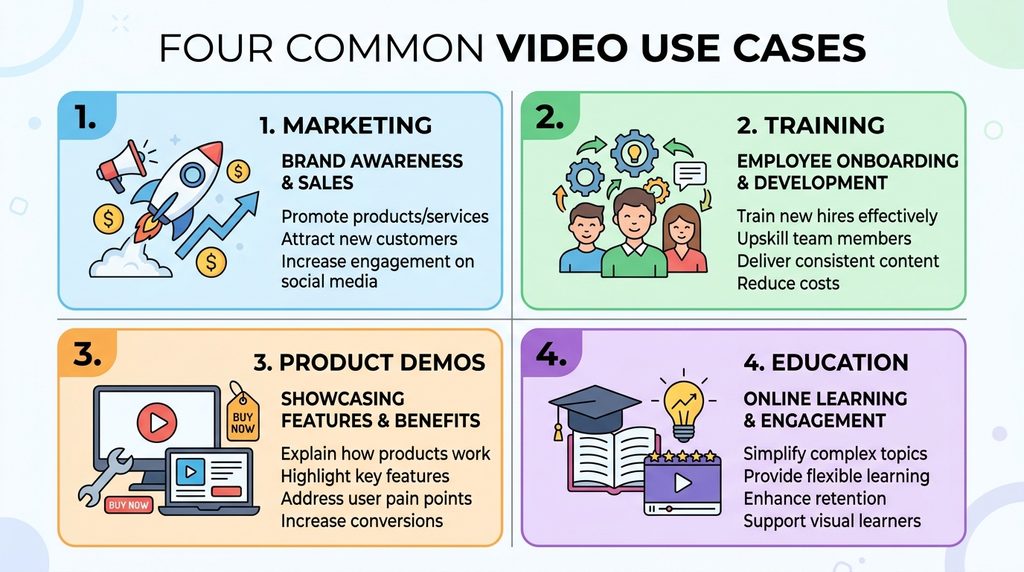
Different generation categories are optimized for different jobs, and trying to force one tool to do everything usually produces mediocre results across the board.
- Marketing and social content: short, attention-grabbing clips where visual polish matters more than long-form narrative.
- Training and internal communications: clarity, consistency, and easy updates matter more than cinematic realism.
- Product demos and explainers: accuracy of visuals tied to real features, often paired with screen recordings.
- Educational or documentary-style content: narration alignment and pacing carry more weight than special effects.
If your work spans more than one category, it’s often more efficient to use two focused tools rather than one generalist platform stretched thin.
Step 2: Match the Generation Method to Your Content
AI video tools generally rely on one of a few underlying approaches, and each has different strengths.
- Text-to-video turns a written prompt into original footage. It’s useful for concept-driven scenes but can be unpredictable with continuity across shots.
- Image-to-video animates a still image or reference photo, which preserves composition and product accuracy better than pure text prompts.
- Avatar and document-to-video tools convert scripts, slides, or documents into presenter-led or narrated videos, which tends to produce more consistent output for training and compliance content.
- Hybrid workflows combine AI-generated clips with traditional screen recording or stock footage, often producing the most reliable results for instructional content.
Testing your actual source material, whether that’s a product photo, a script, or a slide deck, against each method is the only reliable way to see which one fits your content type.
Step 3: Evaluate Output Quality With a Real Test, Not a Demo Reel
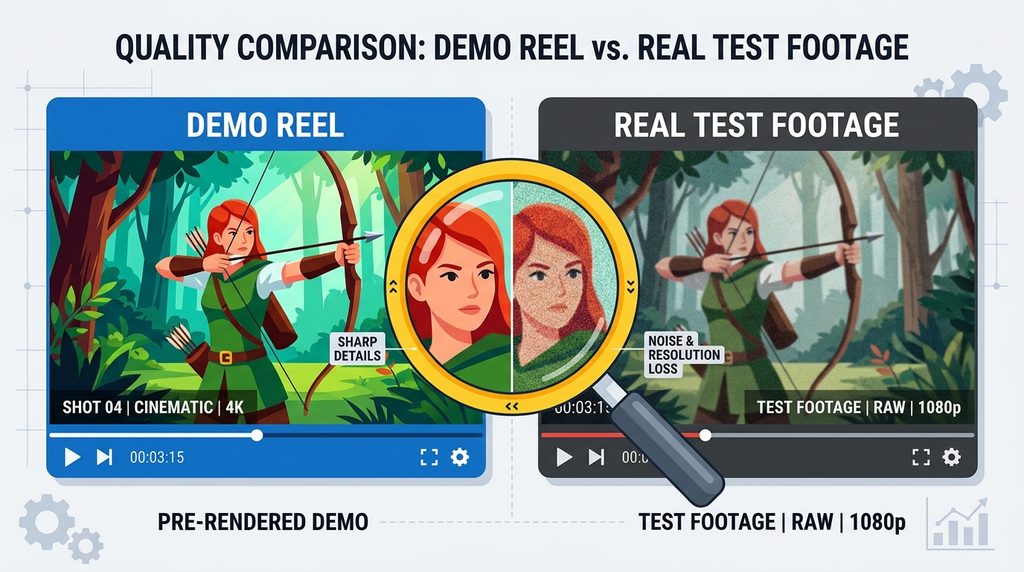
Marketing demos are chosen to make a tool look its best, so they rarely reflect what you’ll get with your own footage. Run a small pilot using the type of content you produce every week: the same product shots, the same tone of script, and the same length constraints you’re actually working under.
Pay attention to motion consistency across a full clip rather than the first two seconds, since many generators look strong in short bursts but drift in longer sequences. Also check how faces, hands, text overlays, and brand colors render, since these are common weak points across generative video tools. If your workflow depends on repeatable results, generate the same prompt three or four times and compare the variance, because a tool that produces wildly different output from an identical prompt will be harder to standardize across a team.
Step 4: Check Editing Control and Integration
A generator that produces excellent raw clips is only half the workflow. You still need to trim, caption, brand, and often localize the footage before it’s publishable.
Look for export formats that match your delivery channels, native caption or subtitle support, and the ability to bring in your own fonts, colors, and logos if brand consistency matters. Integration with the tools you already use, such as a learning management system, a content management system, or single sign-on for larger teams, can save far more time over a year than a slightly better clip in isolation. If your team already works inside a professional editor, check whether the generator can export clean assets rather than a finished, locked video, since raw assets give editors more room to refine the final cut.
Comparison Table: Common AI Video Generator Categories
| Category | Best For | Typical Limitation |
|---|---|---|
| Text-to-video | Concept-driven marketing clips, ideation | Continuity can drift over longer scenes |
| Image-to-video | Product shots, brand-consistent visuals | Limited to what the source image allows |
| Avatar or document-to-video | Training, compliance, internal comms | Less cinematic, more presenter-style |
| Hybrid (AI plus screen recording) | Tutorials, software walkthroughs | Requires more manual editing time |
Step 5: Understand Licensing, Copyright, and Commercial Use Rights
Before you commit budget to any platform, confirm what you’re actually allowed to do with the output. Commercial use terms, resolution limits, and watermark policies vary widely between free and paid tiers, and a tool that looks affordable can become expensive once you need to remove a watermark or unlock commercial licensing.
Copyright status is a separate issue worth understanding early. The US Copyright Office has clarified that content generated with minimal human creative input generally cannot be copyrighted on its own, though work that includes meaningful human selection, arrangement, or editing may qualify for protection. That distinction matters if you plan to register or defend ownership of branded video content down the line.
If your videos involve endorsements, testimonials, or sponsored content, disclosure rules also apply. The Federal Trade Commission’s endorsement guidance treats AI-generated content used in advertising or sponsored posts as something that may require clear disclosure, separate from any paid-partnership disclosure you already use.
Step 6: Budget by Cost Per Finished Video, Not Subscription Price
Comparing monthly subscription costs alone can be misleading. A cheaper plan that requires five regeneration attempts to get one usable clip often costs more in time and credits than a pricier plan that delivers a usable result on the first or second try.
Calculate cost per finished, publishable video rather than cost per generation. Factor in the time your team spends on regenerating, editing, and approving output, since that labor cost is often larger than the subscription fee itself. Also check whether the platform offers a free trial or entry-level credits, since testing several tools against the same script and source material is the most objective way to compare real-world value.
Common Mistakes When Choosing an AI Video Generator
- Choosing based on a single impressive sample clip rather than testing consistency across multiple generations.
- Ignoring commercial licensing terms until after a video is already published or distributed.
- Skipping accessibility requirements like captions, which can create compliance issues for public-facing or workplace content.
- Underestimating environmental and compute cost at scale. Generative video is computationally heavy, and the International Energy Agency’s Energy and AI report projects that global data center electricity demand will more than double by 2030, driven largely by AI workloads. Teams generating video at high volume may want to factor this into vendor evaluations, particularly if sustainability commitments are part of their organization’s goals. This is related to broader questions about how AI systems consume resources, which is worth understanding if you’re scaling video production significantly.
- Not planning for governance. The NIST AI Risk Management Framework offers a voluntary structure for evaluating AI tool risk, including a companion profile specifically addressing generative AI, which larger teams may find useful when formalizing an approval process for new tools.
Accessibility and Disclosure: Don’t Skip These
Captions aren’t optional for most professional or public-facing video content. The World Wide Web Consortium’s media accessibility guidance recommends synchronized captions for prerecorded video with audio, and automated captions alone are often not considered sufficient without human review for accuracy. If your generator doesn’t support caption export natively, plan for a separate captioning step before publishing.
Disclosure matters for a similar reason. Viewers generally have an easier time trusting content when it’s clear how it was produced, particularly for testimonials, product demonstrations, or anything resembling a real customer experience. Building a short disclosure practice into your workflow now avoids retrofitting it later under time pressure.
Image-generation prompt: A simple video player mockup showing a caption bar at the bottom of the frame with placeholder caption lines, demonstrating accessible video captioning, flat UI illustration style.
Suggested ALT text: mockup of a video player showing captions, illustrating accessibility requirements for ai generated video
Quick Decision Checklist
- Write down your top three use cases and rank them by frequency.
- Test each candidate tool with your own source material, not a stock demo.
- Confirm commercial licensing and watermark policy in writing.
- Check caption support and export formats against your publishing channels.
- Calculate cost per finished video, including regeneration time.
- Decide who reviews and approves output before it’s published.
Working through this checklist before signing up for an annual plan will save far more time than reading another comparison chart. For readers exploring adjacent tool categories, browsing more AI tool breakdowns can help round out a broader technology stack decision.
Frequently Asked Questions
What is the best AI video generator for beginners?
There isn’t a single best option for everyone, since beginner-friendliness depends on whether you need text-to-video, avatar-based, or template-driven output. Tools with simple template libraries and guided prompts tend to have the gentlest learning curve, while fully open text-to-video tools require more trial and error to get consistent results.
Can I use AI-generated video for commercial purposes?
It depends entirely on the specific platform’s terms of service, and these vary significantly between free and paid tiers. Always confirm commercial licensing, watermark removal, and resolution limits before using generated footage in paid advertising or client work.
Do AI-generated videos need a copyright disclosure?
Copyright registration and content disclosure are two separate issues. Fully AI-generated material without meaningful human creative input generally cannot be copyrighted on its own, and if the video is used in sponsored or advertising content, separate disclosure rules may apply depending on how the content is used.
How much does an AI video generator typically cost?
Pricing ranges widely, from free tiers with watermarks and limited length to enterprise plans priced per seat or per generation credit. The more useful comparison is cost per finished, publishable video rather than the sticker price of a monthly plan.
Can AI video generators replace professional video editors?
For simple, template-based content, possibly. For branded, complex, or long-form projects, most teams still rely on human editors to refine AI-generated assets, correct inconsistencies, and ensure brand alignment.
Do AI-generated videos need captions?
Yes, in most professional and public-facing contexts. Accessibility guidance recommends synchronized captions for prerecorded video, and many organizations treat this as a baseline requirement rather than an optional extra.
How do I test an AI video generator before committing to a paid plan?
Use the free trial or entry-level credits to generate the same prompt or script multiple times, then compare consistency, quality, and how closely the output matches your brand needs. Testing with your own source material rather than the platform’s demo content gives a much more accurate picture.
Conclusion
Choosing the right AI video generator isn’t about finding the single “best” platform on the market. It comes down to matching a tool’s generation method, editing controls, licensing terms, and real cost to the specific videos your workflow actually needs to produce. Running a small, honest test with your own content before committing to a paid plan will tell you more than any comparison chart ever could.
If you’re ready to narrow down your options, start with the use case that takes up the most of your team’s time each month, test two or three tools against that single use case, and build your decision from there. For more practical breakdowns of AI tools and how they fit into everyday workflows, explore the other guides in our AI section.