AI Internal GPT Solution: How to Choose and Set One Up
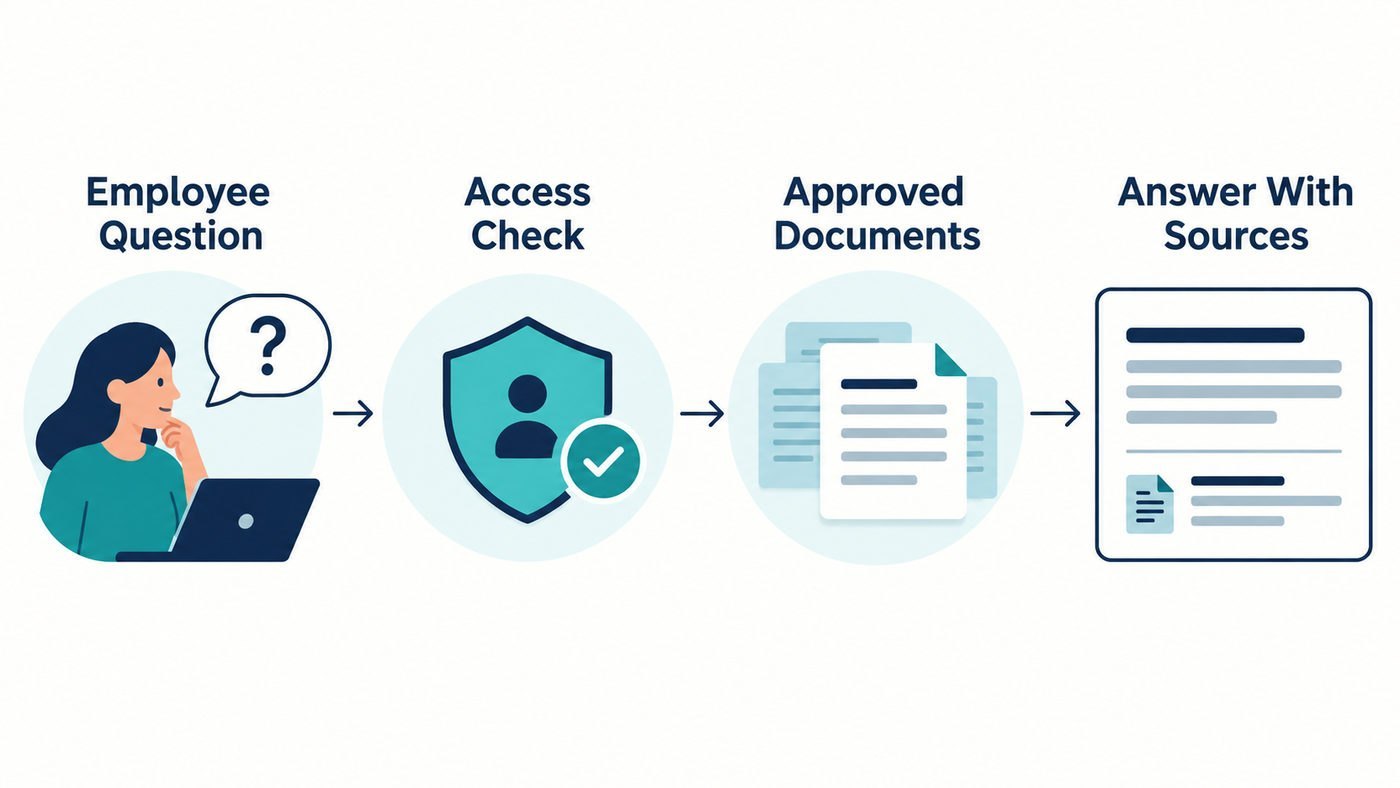
An AI internal GPT solution lets employees ask questions about company information in everyday language. Instead of hunting through folders for a policy or asking a colleague where a document lives, they can request an answer and inspect the source behind it. The useful part is access to the right information. A convincing answer drawn from an outdated policy or a document the employee should never see creates a new problem.
Quick Answer
Start with one well-defined use case, a small set of approved documents, and a tool that can show its sources. Check document permissions before expanding access, and test the assistant with real questions, outdated files, and questions it should decline to answer.
This guide explains what an internal GPT does, how common setup options differ, and what to check before your team relies on one.
Key Takeaways
What Is an AI Internal GPT Solution?
An internal GPT is a conversational tool that helps authorized people find and use information from an organization’s systems. A new employee might ask how to request equipment, while a support agent might ask which troubleshooting procedure applies to a particular issue. The answer should point back to the material used so the employee can verify it.
The term describes a use case, not one specific product. It might refer to a workspace assistant with connected company apps, a custom assistant supplied with reference files, or an application built around a searchable knowledge base. Those approaches differ in setup effort, how often information refreshes, and how precisely they enforce access rules.
A common design uses retrieval-augmented generation, or RAG. When a user asks a question, the system searches relevant material, supplies selected passages to a language model, and generates an answer from that context. Microsoft’s explanation of retrieval-augmented generation describes how search and answer generation work together. Retrieval can make current company information available, but it does not guarantee that the chosen passages or final answer are correct. Microsoft Learn
Where Can an Internal GPT Help?
I would begin with questions that have clear, maintained answers. Onboarding instructions, equipment requests, product documentation, and routine IT procedures are good candidates when someone already owns and updates the source material. A focused assistant can help employees locate the right passage and understand what to do next.
For example, an employee might ask, “How do I request access to the design system?” A useful response identifies the current procedure, links to it, and explains whom to contact if approval is needed. If two documents disagree, the assistant should expose that conflict instead of blending them into an authoritative-sounding answer.
Some tasks need more caution. An assistant can help locate a benefits policy or summarize an approved procedure, but a person should check the source before making a consequential HR, financial, legal, or security decision. Keep actions such as changing account access or sending information to another system behind separate permissions and human review.
Choose the Setup That Fits Your Knowledge
There is no single best platform for every organization. The first decision is whether you need a small reference assistant, live access to existing systems, or a custom application with tighter control over the experience.
| Approach | Best fit | Main point to check |
|---|---|---|
| Assistant with uploaded files | A small, fairly stable collection of approved guides | Who updates the files when the originals change? |
| Workspace assistant with connectors | Information already maintained across company tools | Does it respect each user’s access to the original documents? |
| Custom RAG application | Specific workflows, interfaces, or integration needs | Who will build, test, secure, and maintain it? |
| Self-hosted deployment | Requirements that call for control over the deployment environment | Does the team have the capacity to operate and secure it? |
An uploaded-file pilot can be a manageable starting point. OpenAI’s GPT knowledge documentation distinguishes reference files from the instructions that govern an assistant’s behaviour and recommends testing uploaded material in preview. Creation and sharing options depend on workspace permissions, so confirm the current controls before treating a shared GPT as an internal deployment.
Connected systems can reduce manual file updates, but the connection deserves close inspection. For example, OpenAI says its company knowledge feature follows existing user permissions in connected sources. That is a product-specific capability to verify during evaluation, not a feature to assume every internal chatbot has.

How to Build a Useful First Version
1. Pick one question set
Choose a department and a group of related questions, such as IT onboarding or a single product’s support procedures. Write down what the assistant should answer and what should go to a human. This gives your pilot a boundary that employees can understand.
2. Prepare the source material
Collect the current documents, remove duplicates, and identify an owner for each source. Mark superseded policies clearly or exclude them from retrieval. If a procedure changes next week, someone needs to know how that change reaches the assistant.
3. Define access before adding content
List who can view each document and what happens when someone changes teams or leaves. Apply those rules at retrieval time, not only at the chat screen. Microsoft’s document-level access guidance explains why authorization checks matter when an application retrieves material for generated answers.
4. Require answers that can be checked
Ask the assistant to identify its supporting documents and say when the available material does not answer a question. Test whether a cited passage actually supports the sentence beside it. A link to a document is useful only if the document contains the claimed answer.
5. Test with the people who will use it
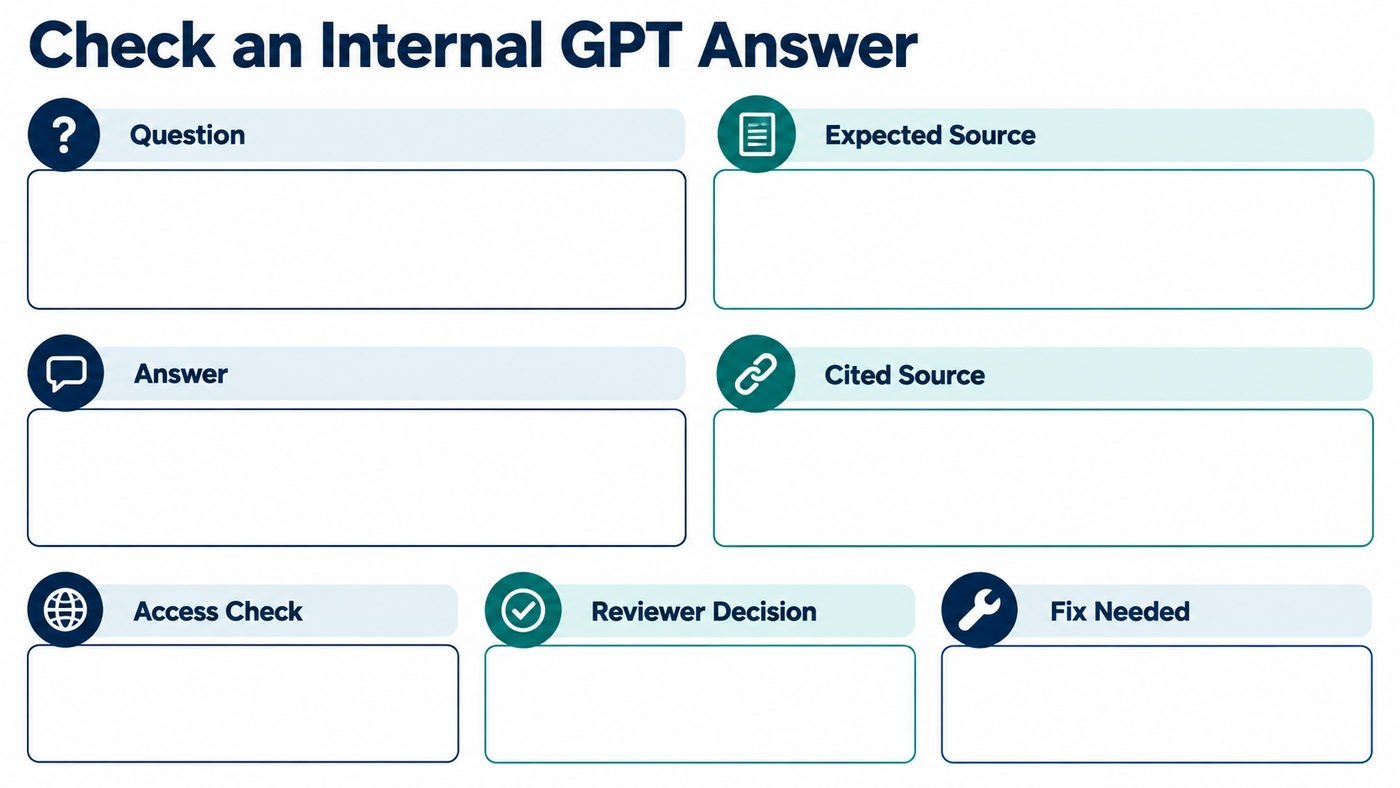
Prepare a set of ordinary, ambiguous, and difficult questions. Include an outdated policy, conflicting documents, a question outside the chosen scope, and a request for a restricted file. Record the answer, the cited source, and what a knowledgeable reviewer says is correct.
6. Assign ongoing ownership
Decide who adds documents, reviews reported errors, checks access changes, and evaluates the tool after updates. A pilot that works on launch day can become unreliable if its knowledge and permissions are left unattended.

Security Questions to Ask Before Launch
“Internal” describes who a tool is intended for. It does not tell you where its data is processed, how long logs remain available, or whether retrieved documents retain their original permissions. Ask the provider or your technical team to explain the complete path of a question, its retrieved passages, and the generated answer.
Check these areas in particular:
- Identity and access: How do employees sign in, and how are access changes reflected?
- Data handling: Which provider processes prompts and retrieved content? What are its retention and model-training terms?
- Document permissions: Can a user’s answer include information from a file they cannot open directly?
- Connected actions: Can the assistant send, edit, or delete information? If so, what approvals limit those actions?
- Monitoring and correction: Can administrators investigate an incorrect answer or suspected disclosure without giving everyone access to private conversations?
The OWASP risks for language-model applications include prompt injection and sensitive information disclosure. For an internal assistant, a practical test is to place an instruction-like sentence inside a test document and check whether the system treats it as source content rather than a command. OWASP Gen AI Security Project
Encryption is another part of the review, although it cannot fix a document-permission error. TechMezz’s guide to how public-key cryptography works explains the underlying idea used in secure exchanges; you should still verify the specific controls and configuration of the product you choose.

How to Judge Whether It Is Working
A good demonstration is less useful than consistent performance on your own questions. Review answers for accuracy, source quality, permission handling, and whether the assistant admits uncertainty. Ask pilot users where the tool saved effort and where it created extra checking work.
Keep a simple review sheet with the question, expected source, actual answer, cited source, reviewer decision, and required fix. Separate a content problem, such as an outdated handbook, from a retrieval problem, where the system missed the right page. If the cited page is correct but the answer misstates it, that is an answer-generation problem. These differences help the team fix the cause instead of repeatedly rewriting the prompt.
One detail I would not overlook is source freshness. A citation to last year’s policy can make a wrong answer look credible. Ask document owners to retire old versions and confirm that connected sources update as expected.
Common Mistakes That Make an Internal GPT Less Useful
The most common mistake is adding a large collection of files before deciding which ones are authoritative. Duplicate procedures and old drafts make it harder to identify the current answer. Start with a maintained collection and expand only after it performs well.
Another mistake is treating a fluent response as proof. Check the cited passage, especially for exceptions, approval steps, and dates. TechMezz’s discussion of evaluating unfamiliar technology claims offers the same useful habit: trace a claim back to evidence before relying on it for a business decision.
Finally, avoid making the assistant responsible for decisions its sources cannot settle. The NIST AI Risk Management Framework provides a voluntary way to assess risks across an AI system’s use. For a small pilot, that principle translates into a straightforward question: what happens when this assistant gives the wrong answer, and who can catch and correct it?
Frequently Asked Questions
Is an internal GPT the same as a custom GPT?
No. A custom GPT is one possible way to create a tailored assistant, while “internal GPT” describes the broader workplace use case. An organization might instead use connected search tools or build its own application.
Does an internal GPT need model fine-tuning?
Usually, the first step is to make approved documents retrievable and test the answers they support. Fine-tuning serves different goals and does not replace document updates, source checks, or permission controls.
Can an internal GPT read confidential documents?
It can if those documents are connected or uploaded and the system permits access. Before adding confidential material, confirm who can retrieve it, how it is processed and retained, and what the provider’s terms say.
What is the difference between an internal GPT and enterprise search?
Enterprise search primarily helps people find documents or passages. An internal GPT can turn retrieved material into a conversational answer, which is convenient but adds a need to verify that its wording matches the source.
How much does an internal GPT solution cost?
Cost depends on the product, number of users, connected systems, usage, and the work needed to prepare and maintain documents. Compare the full cost of administration, security review, and ongoing evaluation, not only the advertised subscription or model fee.
Conclusion
The right AI internal GPT solution helps employees reach approved information and check the answer against its source. Begin with one useful question set, clean documents, enforce access rules, and review real test results before broadening the rollout.
If you are comparing tools now, write down five questions your team asks repeatedly and identify the current document that answers each one. That small exercise will show what your first pilot needs and which knowledge gaps to fix before you buy or build.